How to measure AI search visibility
Measure it in four layers: AI crawlers in your logs, impressions and citations in Search Console and Bing, AI referrals in analytics and scheduled prompt checks for mentions.
The short answer
No single report shows AI search visibility, so measure it in four layers. Server logs show whether AI crawlers fetch your pages. Search Console and Bing Webmaster Tools show impressions and citations in Google’s and Microsoft’s AI answers. Analytics shows visits referred by ChatGPT, Gemini, Perplexity and Copilot. A small panel of prompts, run on a schedule, shows whether answers name you where no report reaches.
What does “AI search visibility” mean in practice?
It is four separate questions, and each has its own data source.
The layers fail differently. A drop in crawler requests is a technical problem. A drop in impressions with steady crawling is a content or eligibility problem. Steady impressions with falling clicks may be the answer satisfying the reader without a visit.
What does Search Console show for AI Overviews and AI Mode?
Two things: AI traffic folded into the normal Performance report, and a separate Generative AI performance report that counts impressions only.
Google’s page on AI features says sites appearing in AI Overviews and AI Mode are included in the overall search traffic in Search Console, under the Web search type of the Performance report. Google’s help page on impressions, position and clicks sets out how they are counted:
| Feature | Click | Position | Note |
|---|---|---|---|
| AI Overviews | A click on a link to an external page | The whole Overview takes one position, shared by all its links | Standard impression rules |
| AI Mode | A click on a link to an external page | Same method as a normal results page | A follow-up question counts as a new query |
On 3 June 2026 Google announced Search Generative AI performance reports, one for Search and one for Discover, first for a subset of sites. A note on the announcement says they reached all websites worldwide on 31 August 2026. The Search report, according to its help page:
- covers AI Overviews and AI Mode, a list Google says may change
- shows impressions only, defined as how many times links to your site appeared in a generative AI feature
- counts several links from one site in the same AI result as one impression in the chart
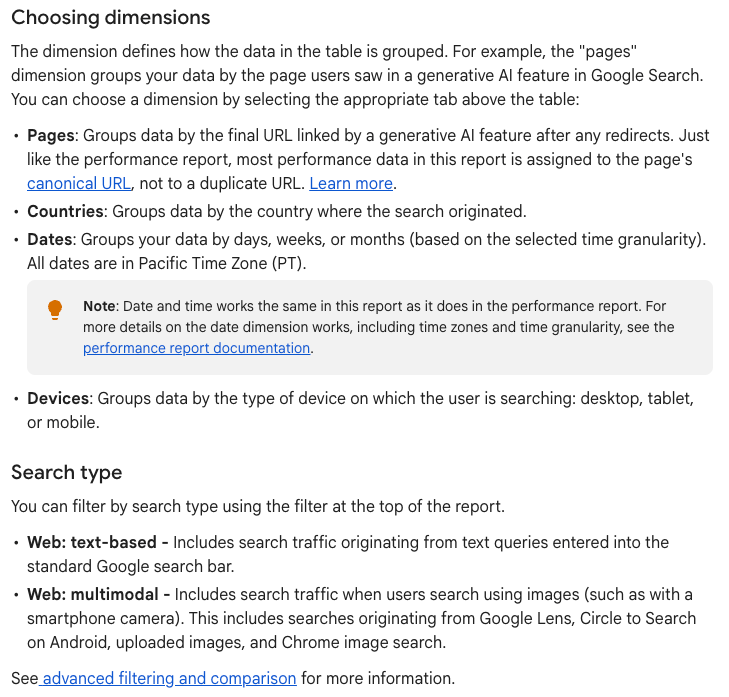
- breaks data down by page (assigned to the canonical URL), country, date, device and search type, which splits “Web: text-based” from “Web: multimodal” searches such as Google Lens and Circle to Search
- leaves out Search Labs experiments and sites that are excluded from Search generative AI features
- may not appear for a site with too few generative AI impressions
What does Search Console not show?
The gaps matter as much as the data.
- There is no query dimension in the Generative AI report, so you see which pages appeared but not for which questions.
- The report counts impressions. Google documents no click, CTR or position metric for it.
- AI Overview and AI Mode clicks sit inside the Web totals of the Performance report. Google documents no filter that separates them from ordinary result clicks.
- Search Labs experiments are excluded everywhere in Search Console.
- Other assistants are out of scope. Gemini app, ChatGPT and Perplexity answers never appear here.
Google’s own AI optimization guide points site owners to this report and adds that no third-party tool has access to Google’s internal ranking or AI systems. Any outside tool that reports AI Overview visibility is sampling public results.
How do you track visits from ChatGPT, Gemini, Perplexity and Copilot?
Use the referrer, and in Google Analytics 4 start with the AI Assistant channel.
Google Analytics added an AI Assistant channel to the default channel group on 13 May 2026. Its definition sets the medium to ai-assistant and the campaign to (ai-assistant) when the referrer matches Google’s list of AI assistants. The help page names ChatGPT, Gemini, DeepSeek, Copilot and Grok as examples and states that the channel excludes Google’s AI Overviews and AI Mode. For clicks from those two, use Search Console instead.
For anything the channel misses, or for other analytics tools, filter on the referring host:
| Assistant | Referrer to look for | Extra signal |
|---|---|---|
| ChatGPT | chatgpt.com |
ChatGPT adds utm_source=chatgpt.com to referral links, per OpenAI’s publisher FAQ |
| Gemini | gemini.google.com |
|
| Perplexity | perplexity.ai |
|
| Microsoft Copilot | copilot.microsoft.com |
|
| Claude | claude.ai |
A custom channel group in GA4 with a source rule such as chatgpt\.com|gemini\.google\.com|perplexity\.ai|copilot\.microsoft\.com|claude\.ai gives one line to watch. Google says custom channel groups can be applied to reports retroactively, so that line also covers visits from before you created it.
Two cautions. Visits from desktop and mobile apps can arrive with no referrer and land in Direct, so referral counts are a floor. And a visit is a click, which is the narrowest of the four layers; many answers that use your page never send anyone.
How do you see AI crawlers in server and CDN logs?
Search your access logs for the user-agent tokens each company documents, then verify the IPs.
| Token | Operator | What it does |
|---|---|---|
| GPTBot | OpenAI | Collects content that may be used to train models |
| OAI-SearchBot | OpenAI | Crawls to surface sites in ChatGPT search |
| ChatGPT-User | OpenAI | Fetches a page when a user’s request needs it; robots.txt may not apply |
| ClaudeBot | Anthropic | Collects content that may be used for training |
| Claude-SearchBot | Anthropic | Crawls to improve search answers |
| Claude-User | Anthropic | Fetches a page when a Claude user asks |
| PerplexityBot | Perplexity | Surfaces and links sites in Perplexity search |
| Perplexity-User | Perplexity | Fetches a page for a user’s question; generally ignores robots.txt |
| Googlebot | Crawls for Search, including AI Overviews and AI Mode | |
| Google-Extended | A robots.txt control only, with no user agent of its own |
A one-line count per bot from a standard access log:
grep -oE "GPTBot|OAI-SearchBot|ChatGPT-User|ClaudeBot|Claude-SearchBot|Claude-User|PerplexityBot|Perplexity-User" access.log | sort | uniq -c | sort -rnRead the split between bot types. Training crawlers (GPTBot, ClaudeBot) say little about visibility in answers. Search crawlers (OAI-SearchBot, Claude-SearchBot, PerplexityBot) show whether you can be found by those answer engines. User fetchers (ChatGPT-User, Claude-User, Perplexity-User) are the closest log signal to a live answer using your page.
Google-Extended needs a separate note. Google says it has no HTTP user agent string of its own; Google crawls with its existing user agents and reads the token only as a robots.txt control over Gemini training and grounding. It does not affect inclusion or ranking in Google Search. You will never see it in a log.
User-agent strings can be faked, so verify. OpenAI publishes IP lists for GPTBot, OAI-SearchBot and ChatGPT-User; Perplexity publishes lists for both its agents; Anthropic publishes one at claude.com/crawling/bots.json; Google documents reverse DNS checks and published IP ranges. If your site runs behind Cloudflare, its AI Crawl Control dashboard, available on all plans, shows which AI services request your content and whether they follow robots.txt.
How do you check whether AI answers cite you?
Use the first-party report where one exists, and sample the rest.
Microsoft publishes a citation report for its own surfaces. Bing Webmaster Tools added AI Performance as a public preview on 10 February 2026. It shows total citations across Microsoft Copilot, AI summaries in Bing and some partner integrations, the average number of your pages cited per day, page-level citation counts and the grounding queries used to retrieve your content. Bing says the grounding query data is a sample. On 16 June 2026 Bing began rolling out four previews: Intents, Topics, Citation Share and Compare. Citation Share shows your portion of all citations for a grounding query. Bing says it does not represent traffic share, and neither post describes click data.
For ChatGPT, Perplexity, Claude, Gemini and AI Mode, build a prompt panel:
- Write 20 to 50 questions your buyers actually ask, in their words, across the topics you want to own.
- Run each one on each assistant on a fixed schedule, logged out or in a clean profile, and record whether you are named, whether you are linked and which page is cited.
- Run each prompt several times per round. A SparkToro and Gumshoe study published in January 2026 ran the same brand prompts 60 to 100 times each and found under a 1 in 100 chance of ChatGPT or Google’s AI returning the same list twice. Frequency of appearance was more stable than position.
- Report the share of runs that mention or cite you, since a single position in one run means little.
Commercial trackers automate this, with the same limit: they sample answers. The SparkToro study was co-written with a company that sells tracking tools and was not peer-reviewed, which is worth knowing when reading any vendor’s precision claims.
Which signal lives where?
| Signal | Where to find it | What it cannot tell you |
|---|---|---|
| AI crawler requests | Server or CDN logs; Cloudflare AI Crawl Control | Whether a fetch led to a citation |
| Impressions in AI Overviews and AI Mode | Search Console, Generative AI performance report (Search) | Queries, clicks or position |
| Impressions in Discover generative AI features | Search Console, Generative AI performance report (Discover) | Clicks |
| Clicks from AI Overviews and AI Mode | Search Console Performance report, Web search type | Which clicks came from AI features |
| Citations in Copilot and Bing AI summaries | Bing Webmaster Tools, AI Performance | Clicks; grounding queries are sampled |
| Visits from ChatGPT, Gemini, Copilot and others | GA4 AI Assistant channel; session source; utm_source=chatgpt.com |
AI Overviews and AI Mode; app visits with no referrer |
| Mentions and citations in assistant answers | Your prompt panel or a tracking tool | Anything beyond the sampled prompts |
What to do
- Check that Googlebot, OAI-SearchBot, Claude-SearchBot and PerplexityBot are allowed in robots.txt and appear in your logs, and verify their IPs.
- Open the Generative AI performance report in Search Console and record monthly impressions for your top 20 pages.
- Verify your site in Bing Webmaster Tools and export AI Performance citations and grounding queries each month.
- Confirm the AI Assistant channel appears in GA4, and add a custom channel group for AI referrers it misses.
- Set up a prompt panel of 20 to 50 buyer questions, run each several times a month and track share of runs that cite you.
- Put the four layers on one monthly sheet, and look for the layer that moved before deciding what to fix.